

- Choosing a selection results in a full page refresh.

Couldn't load pickup availability




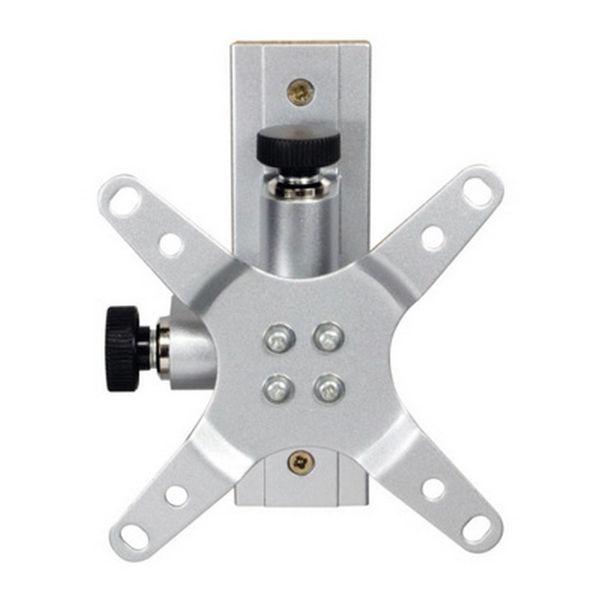
The Car Best LCD TV Tilt Wall Bracket is designed to mount a compatible TV to a vertical wall surface, such as:
internal walls in motorhomes, caravans, boats, RVs and homes
flat stud walls or solid walls (brick/concrete) using appropriate fixings
This bracket supports compact LCD screens from approx. 13″–30″ with VESA patterns of 75×75mm to 100×100mm and holds TVs weighing up to 23 kg.
Applications:
✔ Motorhome / caravan lounge or bedroom
✔ Campervan wall mount for TV
✔ Boat or cabin wall
✔ Home wall (bedroom, kitchen, small screens)
Before You Start
Check your TV’s VESA mounting pattern (should be between 75×75mm and 100×100mm).
Ensure the wall type can support the TV + bracket + fixings (solid wall or reinforced stud wall).
Tools you’ll need: drill with suitable bits, screwdriver, level, tape measure, pencil, wall plugs/screws.
Decide Mounting Position
Choose a comfortable viewing height and position on the wall.
Use a spirit level to mark a straight horizontal line where the bracket will sit.
Mark Drilling Points
Hold the wall plate against the wall and mark the holes for fixings.
Ensure the plate is level before marking.
Drill the Wall
Drill holes appropriate for your wall type: brick/concrete or stud.
Fit wall plugs if mounting on masonry, or use suitable screws and anchors for stud walls.
Fix the Wall Plate
Secure the bracket’s wall plate to the wall using the screws and anchors.
Make sure all fasteners are tightened securely so the bracket won’t move.
Attach Bracket to TV
Place the bracket arms on the back of the TV and align with the TV’s VESA holes.
Use the supplied screws to secure the bracket to the TV’s rear.
Take care not to overtighten and avoid damaging the TV chassis.
Hang TV on Wall Plate
Lift the TV and hook it onto the wall plate according to the bracket design.
Confirm it is fully engaged and supported before letting go.
Adjust Tilt and Position
Tilt the TV to the desired angle for best viewing comfort.
Double-check that all fixings remain secure after final adjustments.
Mount type: Tilt wall mount for LCD/LED TVs
Screen support: approx. 13″–30″ TVs
VESA compatibility: 75×75mm to 100×100mm
Maximum load: 23 kg
Bracket dimensions: ~114 × 114 × 98 mm
Finish: Aluminium, Silver
Tilt adjustable: Yes — tilt angle can be set after mounting for optimal viewing.
TV bracket with angle and tilt adjustment. For TV screens from 13"- 30". Holes 75mm - 100mm - (VESA).
• 114mm x 114mm x 98mm
• Carries TVs up to 23KG in weight
• Bracket weight - 0.6KG
• Made from aluminium (Colour: Silver)
Thanks for subscribing!
This email has been registered!
| Product | SKU | Description | Collection | Availability | Product Type | Other Details |
|---|