


- Choosing a selection results in a full page refresh.



Couldn't load pickup availability




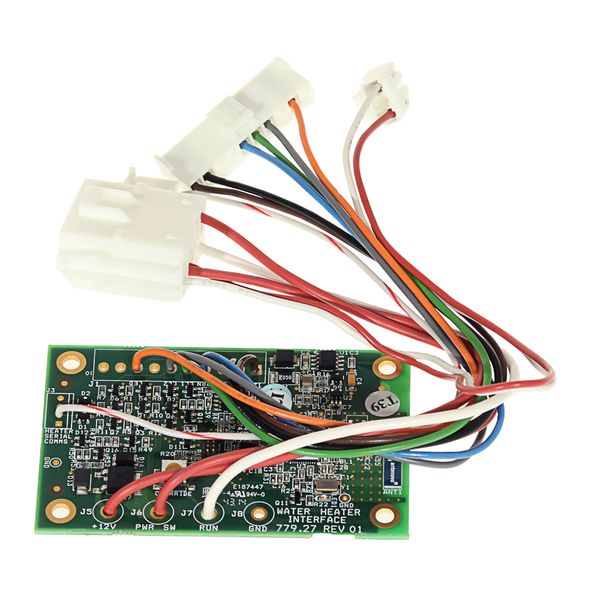
The Whale Zigbee PCB (AK1226) installs inside a Whale water heater and is used to enable wireless (Zigbee) communication between the water heater and a compatible Whale control panel or smart control system.
It is not a user-facing control. Instead, it fits internally within the heater’s electronics compartment, typically behind the heater casing, and connects directly to the heater’s main control board.
Typical applications:
Caravans
Motorhomes
Campervans
RVs fitted with compatible Whale water heaters
Important: This is an internal electronic component. Installation should be carried out by a competent installer or service engineer. Always isolate power before fitting.
Switch OFF 12 V and 230 V power supplies to the water heater.
Allow the heater to cool fully.
Confirm compatibility with your Whale water heater model.
Tools typically required: screwdriver set, anti-static precautions recommended.
Access the water heater
Locate the water heater unit inside the vehicle (often under a seat, bed, or cupboard).
Remove the heater’s service cover to expose the internal electronics compartment.
Locate the PCB mounting position
Identify the designated PCB slot or mounting points on the heater’s control board area.
The Zigbee PCB is designed to fit only in the correct orientation.
Install the Zigbee PCB
Carefully insert the AK1226 Zigbee PCB into the appropriate connector on the main control board.
Ensure it is fully seated and secure — do not force the connection.
Secure the PCB
Fix the PCB using the retaining clips or screws provided (if applicable).
Check that wiring is not trapped or under tension.
Reassemble the heater
Refit the electronics cover and secure all screws.
Ensure seals and covers are correctly positioned.
Restore power & pair
Reconnect the 12 V / 230 V supply.
Follow the Whale control panel instructions to pair or enable Zigbee communication.
Test heater operation via the control panel to confirm successful communication.
Product type: Internal Zigbee communication PCB
Fits: Compatible Whale water heaters
Location: Inside water heater electronics compartment
Function: Enables wireless control/communication with Whale control panels
Installation: Internal fit – professional installation recommended
Tools required: Basic hand tools
If the control panel does not detect the heater after installation, power-cycle the system and repeat the pairing process. Ensure no other Zigbee devices are interfering during initial setup
Thanks for subscribing!
This email has been registered!
| Product | SKU | Description | Collection | Availability | Product Type | Other Details |
|---|